
No products in the cart.
new
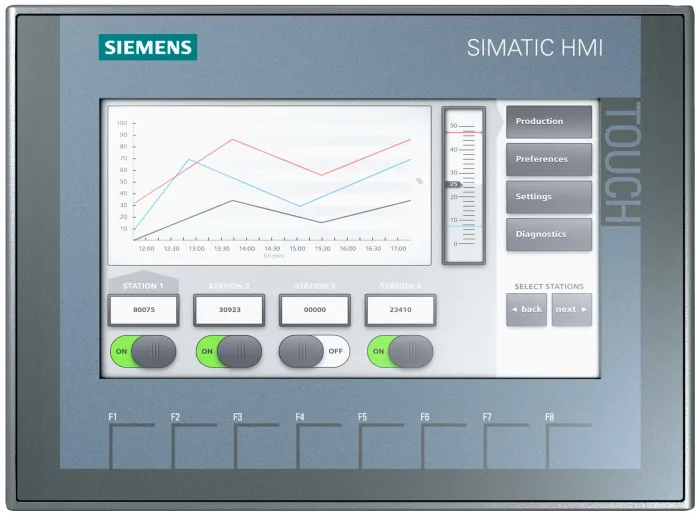
Siemens SIMATIC HMI KTP700 Basic Panel
- Display Dimensions & Technology: 7.0-inch widescreen TFT display with 65,536 selectable colors and dimmable LED backlighting
- Screen Resolution: High-resolution widescreen display with 800 $\times$ 480 pixels for clear graphic visualization
- Operator Interface: Combined analogue-resistive touchscreen operation and 8 configurable tactile function keys with labeling strips
- Network Interfacing: Integrated RJ45 Ethernet port supporting PROFINET IO, TCP/IP, and Modbus TCP/IP communication protocols
- Hardware Expansion: Integrated USB 2.0 host port for peripheral mouse/keyboard connection, firmware updates, and USB memory stick data logging
Description
The Siemens KTP700 Basic Panel delivers dependable, high-resolution human-machine visualization and tactile process control engineered specifically for packaging machinery, pump control skids, conveyor sorting lines, and industrial automation panels.
Intuitive Machine Visualization with the Siemens KTP700 Basic Panel
Designed for cost-effective operator control in compact and modular machinery, the Siemens KTP700 Basic Panel combines an intuitive widescreen touch interface with physical membrane function keys. Its 7-inch TFT display renders 65,536 vivid colors at 800 × 480 pixel resolution, providing up to 40% more visible screen workspace compared to conventional 4:3 aspect ratio operator panels. This allows process engineers to display detailed diagnostic alarm screens, trend charts, and equipment schematics simultaneously.
The operator terminal integrates directly into networked automation systems via an embedded RJ45 PROFINET interface. Through seamless integration inside Siemens TIA Portal software, graphics, tags, and alarm messages link natively to SIMATIC S7-1200 and S7-1500 programmable controllers without redundant data entry, speeding up project commissioning and field maintenance cycles.
Key Features and Engineering Advantages
- Combined Touch and Key Operation: Offers flexible operator control via responsive analogue-resistive touchscreen alongside 8 programmable tactile function keys.
- Widescreen TFT Display: 16:9 aspect ratio display with 800 × 480 resolution and adjustable LED backlight dimming maximizes screen readability from wide viewing angles.
- Seamless TIA Portal Integration: Configured using WinCC Basic or Comfort within the TIA Portal framework, enabling shared tag databases and standardized graphics libraries.
- USB Data Logging & Archiving: Onboard USB host port enables convenient project backup, operating recipe storage, and automated CSV trend logging to commercial thumb drives.
- Rugged Front Enclosure: Industrial IP65 / NEMA 4X front bezel seals against water washdown sprays, abrasive plant dust, and harsh factory floor environments.
Industrial Applications and Process Integration
The Siemens KTP700 Basic Panel is deployed across varied machine-level and utility tasks, including:
- Packaging machinery, shrink-wrap equipment, case sealers, and automated pallet wrapping skids.
- Municipal booster pump sequencing, valve station monitoring, and reverse osmosis water skids.
- Material handling roller conveyors, automated guided vehicles (AGV), and sorter diverters.
- HVAC central air handling plant monitoring, industrial chiller staging, and environmental chambers.
Frequently Asked Questions
What is the difference between the KTP700 Basic PN and KTP700 Basic DP models?
The KTP700 Basic PN features an onboard RJ45 Ethernet port for PROFINET and Modbus TCP/IP communication. The KTP700 Basic DP variant is equipped with an RS-485/RS-422 serial interface designed for legacy PROFIBUS DP and MPI automation networks.
Can the panel log process data directly to an external USB flash drive?
Yes. The built-in USB 2.0 host port allows automatic archiving of process variables, cycle trends, and alarm logs into standard CSV files on an attached USB flash drive for diagnostic evaluation.
Which engineering software is required to program this operator panel?
The panel is engineered using Siemens WinCC (TIA Portal), starting from the cost-effective WinCC Basic license up to WinCC Professional. It cannot be configured using legacy WinCC flexible software.
Reviews (0)
Reviews
There are no reviews yet.




-
(0 customer reviews)